

Quick Overview
AI video generators have changed how creators, marketers, businesses, educators, and filmmakers produce video content. Instead of recording every scene manually or spending hours editing footage, users can now create videos from text prompts, images, scripts, avatars, and existing content. However, the best AI video generator depends heavily on what you want to create. A cinematic text-to-video tool is very different from an AI avatar platform designed for training videos or a social media tool built for short-form content.
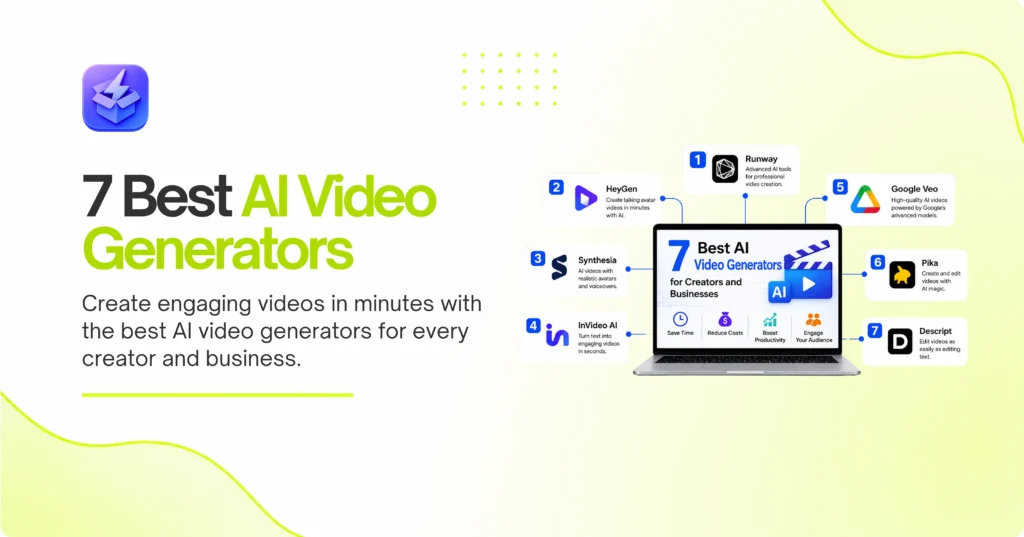
In this guide, we compare seven of the best AI video generators for different use cases. Runway is a strong choice for creative professionals who want advanced control over generative video. HeyGen and Synthesia are better suited to businesses that need AI presenters and multilingual videos. InVideo AI simplifies the process of turning ideas into complete videos, while Google Veo focuses on high-quality generative video creation. Pika is useful for quick creative clips and social media effects, while Descript combines AI video creation with transcript-based editing.
We compare these tools based on their primary use cases, AI capabilities, ease of use, output quality, workflow features, and overall value. Whether you need marketing videos, training content, cinematic scenes, social media clips, or AI avatars, this list can help you choose the right platform.
Best AI Video Generators Compared
| AI Video Generator | Best For | Starting Price* | Main Strength |
|---|---|---|---|
| Runway | Creative professionals | From $15/month | Generative video control |
| HeyGen | AI avatars and marketing | From $24/month | Avatars and translation |
| Synthesia | Corporate training | From $18/month annually | Business presenters |
| InVideo AI | Beginners and marketers | From around $17/month | Prompt-to-video workflow |
| Google Veo | High-quality generative video | Varies by access | Realistic video generation |
| Pika | Social media creativity | Varies by plan | Creative effects |
| Descript | AI editing and repurposing | Varies by plan | Text-based video editing |
*Pricing and plan features may change. Check the provider’s official pricing page before purchasing.
1. Runway Offers Powerful AI Video Creation Control
Runway is one of the strongest AI video platforms for creators who want more than a simple prompt-to-video experience. The platform is designed for generative video creation, image-to-video workflows, creative effects, and professional experimentation. Its appeal comes from the amount of creative control it gives users compared with simpler AI video makers.
Runway is especially useful when you want to create cinematic shots, transform visual concepts, animate still images, or experiment with visual effects. Rather than producing an entire finished marketing video from one prompt, Runway is often better suited to generating individual scenes that can later be combined into a larger production.
Creative Control for Professional Video Projects
The platform is a strong fit for filmmakers, agencies, designers, and creative teams. Users can start with text prompts, reference images, or existing visual material and then experiment with movement, composition, and style. This makes Runway useful for concept development and visual prototyping.
However, the tool requires more creative input than beginner-focused platforms. You may need to generate several versions of a scene before receiving the result you want. Therefore, Runway is best for users who are comfortable refining prompts and reviewing multiple generations.
Best Uses and Potential Limitations
Runway works particularly well for cinematic B-roll, concept videos, creative advertisements, visual effects, and experimental content. It can also support production workflows where creators want to generate a specific shot rather than an entire video automatically.
The main limitation is that AI video generation uses credits or other usage limits depending on the selected plan. Heavy users may need a higher subscription tier. Nevertheless, for creators who value control and visual experimentation, Runway remains one of the best AI video generators available.
2. HeyGen Simplifies AI Avatar Video Production
HeyGen is one of the best AI video generators for businesses that need professional videos featuring digital presenters. Instead of filming a real person for every video, users can select an AI avatar, write a script, choose a language, and generate a presentation-style video.
The platform is especially popular for marketing, sales outreach, onboarding, training, and international content. Its multilingual capabilities also make it useful for companies that need to adapt videos for different markets.
Create Business Videos Without a Camera
One of HeyGen’s biggest advantages is its simple production workflow. A user can create a script, choose an avatar, select a voice, and generate a video without needing a camera, studio, or traditional editing software.
This makes the platform useful for companies that regularly create product demonstrations, internal announcements, explainer videos, and educational content. Teams can also create consistent videos without requiring employees to record themselves repeatedly.
Translation and Localization for Global Audiences
HeyGen is particularly useful for businesses operating across multiple countries. AI translation and dubbing features can help companies adapt videos for different languages and audiences. According to current platform information, HeyGen supports a large range of avatars and languages, making it one of the more flexible AI avatar tools available.
The platform may not be the best choice for cinematic storytelling or complex visual effects. However, for business presentations, marketing videos, and localized content, HeyGen is one of the strongest options.
3. Synthesia Is Ideal for Corporate Training Videos
Synthesia focuses primarily on business video creation. Its platform allows organizations to create professional videos using AI presenters, voiceovers, templates, and multilingual capabilities. As a result, it is particularly popular among companies that need training, onboarding, compliance, and internal communication content.
Instead of asking employees or trainers to record the same information repeatedly, businesses can create reusable AI-presenter videos and update them whenever information changes.
Build Training and Onboarding Content Faster
Training departments can use Synthesia to create onboarding videos, software tutorials, compliance lessons, and internal presentations. The platform helps companies standardize the visual quality of their content while reducing the time required for recording and editing.
This is particularly valuable for organizations with distributed teams. A single training script can be adapted for employees in different regions and languages.
A Strong Choice for Enterprise Workflows
Synthesia is built with business users in mind. Organizations often need brand consistency, collaboration features, centralized content management, and reliable production workflows. These requirements make the platform more suitable for professional teams than many consumer-focused AI video tools.
The main drawback is that Synthesia is primarily designed for presenter-led content. If your goal is cinematic storytelling or realistic fantasy scenes, another generative video platform may be more suitable. For corporate learning and development, however, Synthesia is a strong choice.
4. InVideo AI Makes Video Creation Easier for Beginners
InVideo AI is designed for users who want to turn a simple idea or prompt into a complete video. The platform focuses on simplifying the process of scriptwriting, scene creation, media selection, voiceovers, and editing.
This makes it particularly useful for marketers, YouTubers, social media managers, small businesses, and beginners who may not have advanced video editing skills.
Turn Prompts and Scripts Into Complete Videos
Rather than requiring users to create every scene manually, InVideo AI can help build a video from a written instruction. Users can describe the subject, tone, audience, and format they want, and the platform can assist with creating the video structure.
This approach is useful for explainer videos, social media content, YouTube videos, promotional material, and educational content. It reduces the time between having an idea and producing a usable first draft.
Useful for Marketing and Social Media Teams
InVideo AI is particularly valuable when a business needs to produce a large volume of content. Marketing teams can create variations of videos for different campaigns, audiences, or platforms.
However, automatically generated videos still require human review. Scripts may need editing, visual selections may not always match the message, and brand guidelines should be checked before publishing. InVideo is therefore best viewed as a fast production assistant rather than a complete replacement for creative direction.
5. Google Veo Targets High-Quality Generative Video
Google Veo is designed for advanced generative video creation. It is aimed at users who want realistic visuals, detailed scenes, and high-quality output from natural-language prompts. Its position in the market makes it particularly interesting for creators who prioritize visual realism and cinematic production.
The platform is part of Google’s broader generative AI ecosystem, and current versions are frequently discussed among the leading tools for high-fidelity AI video creation.
Generate Detailed Scenes From Text Prompts
Veo is useful for creating scenes that require detailed descriptions of environments, camera movement, lighting, subjects, and visual style. This makes it appealing to filmmakers, advertisers, designers, and creative professionals exploring AI-generated footage.
The more specific the prompt, the more control the user can have over the intended scene. However, as with other generative video tools, consistent characters and complex multi-scene storytelling can still require experimentation.
When Should You Choose Google Veo?
Choose Veo when visual quality and realistic scene generation are more important than a simple business video workflow. It is better suited to creative production than routine corporate presentations.
Users should also consider access, pricing, availability, and usage limits because these can vary depending on the Google product or plan through which the model is offered. For creators who want high-end generative video capabilities, Veo deserves serious consideration.
6. Pika Is Great for Fast Creative Video Effects
Pika is a user-friendly AI video platform focused on creative generation and visual effects. It is particularly popular among creators who want to turn images or ideas into short, engaging video clips.
Unlike enterprise-focused AI video platforms, Pika is often more appealing to social media creators and users who want to experiment with unusual visual concepts.
Create Short Clips for Social Media
Pika is useful for creating short videos for platforms such as TikTok, Instagram, YouTube Shorts, and other social networks. Creators can experiment with animation, movement, transformations, and stylized effects.
The short-form nature of these tools makes them useful for testing creative ideas quickly. A creator can generate multiple concepts and select the version that has the strongest potential for audience engagement.
A Good Choice for Experimentation
Pika is best suited to users who enjoy experimenting with visual ideas. It can help transform static images into moving scenes and create effects that would otherwise require traditional editing skills.
However, users looking for long-form video production, complex business presentations, or advanced corporate workflows may need a more specialized platform. Pika’s strength is speed, accessibility, and creative experimentation rather than complete end-to-end video production.
7. Descript Combines AI Video Creation With Editing
Descript takes a different approach from traditional text-to-video generators. Instead of focusing exclusively on creating new footage from prompts, it combines AI-powered editing with a transcript-based workflow.
This makes it especially useful for podcasters, YouTubers, educators, marketers, and businesses that already have recorded video or audio content.
Edit Videos by Editing the Transcript
One of Descript’s defining features is the ability to edit video through its transcript. When you delete words from the text, the corresponding section can be removed from the video. This makes editing interviews, presentations, podcasts, and tutorials much faster.
For content creators, this can significantly reduce the time spent searching through a video timeline. It also makes the editing process more accessible to users who are comfortable working with written content.
Repurpose Long Videos Into Short Content
Descript can also help creators repurpose long recordings into shorter clips. A podcast, webinar, or interview can be converted into multiple pieces of content for social media.
The platform is therefore less focused on generating entirely fictional scenes and more focused on using AI to improve the production process. If your business already creates video content, Descript can be an excellent addition to your workflow.
How to Choose the Best AI Video Generator
The best AI video generator depends on your specific production requirements. Before choosing a platform, consider the type of videos you create most frequently.
If you need cinematic scenes and creative control, Runway or Google Veo may be the better options. Businesses creating training or presentation videos should consider Synthesia or HeyGen. Beginners who want to generate complete videos quickly may prefer InVideo AI.
You should also evaluate the following factors:
Consider Your Video Format and Workflow
First, determine whether you need text-to-video generation, AI avatars, video editing, image-to-video creation, or a combination of these capabilities. Many tools specialize in one category.
For example, a company creating employee training content has very different requirements from a filmmaker creating cinematic B-roll. Choosing a platform based on your actual workflow will prevent you from paying for features you rarely use.
Check Quality, Credits, and Commercial Usage
AI video platforms often use credits, generation limits, or different output restrictions across subscription tiers. Therefore, do not compare monthly prices alone.
Check the resolution, generation limits, watermark rules, commercial usage rights, export formats, and available integrations before subscribing. A cheaper plan may become expensive if your team needs additional credits every month.
Final Thought
The best AI video generator is not necessarily the platform with the most impressive demonstration video. Instead, it is the tool that fits your production workflow, budget, skill level, and content goals. AI video technology has developed rapidly, but different platforms continue to serve very different audiences.
Runway is a strong option for creative professionals who want control over generative video and visual experimentation. HeyGen and Synthesia are better suited to businesses that need AI presenters, training videos, and multilingual content. InVideo AI is an excellent choice for beginners and marketers who want to create complete videos quickly. Google Veo is attractive to creators focused on high-quality generative scenes, while Pika is useful for short-form creative experimentation. Descript stands apart by using AI to simplify editing and content repurposing.
Before choosing a subscription, identify the type of video you create most often. Then test the platform’s free plan or trial whenever possible. Pay attention to the quality of the first usable result, not just the most impressive demo. Also consider how quickly you can revise videos, maintain brand consistency, and export content for the platforms you use.
For most businesses, the best approach may be to combine different AI tools rather than depend on one platform for every task. A company might use Synthesia for training, Runway for creative visuals, and Descript for editing. By matching the right tool to the right workflow, AI video generators can reduce production time while helping creators produce more content consistently.