Software can be classified on the basis of its application, platform, deployment method, licensing, development model, size, and interface. Common software categories include system and application software, native and cross-platform software, installed and cloud software, proprietary and open-source software, traditional and agile software, small-scale and enterprise software, and GUI or CLI software. These categories assist in choosing the appropriate software for particular requirements. In this post, we will find out how to classify software applications components.
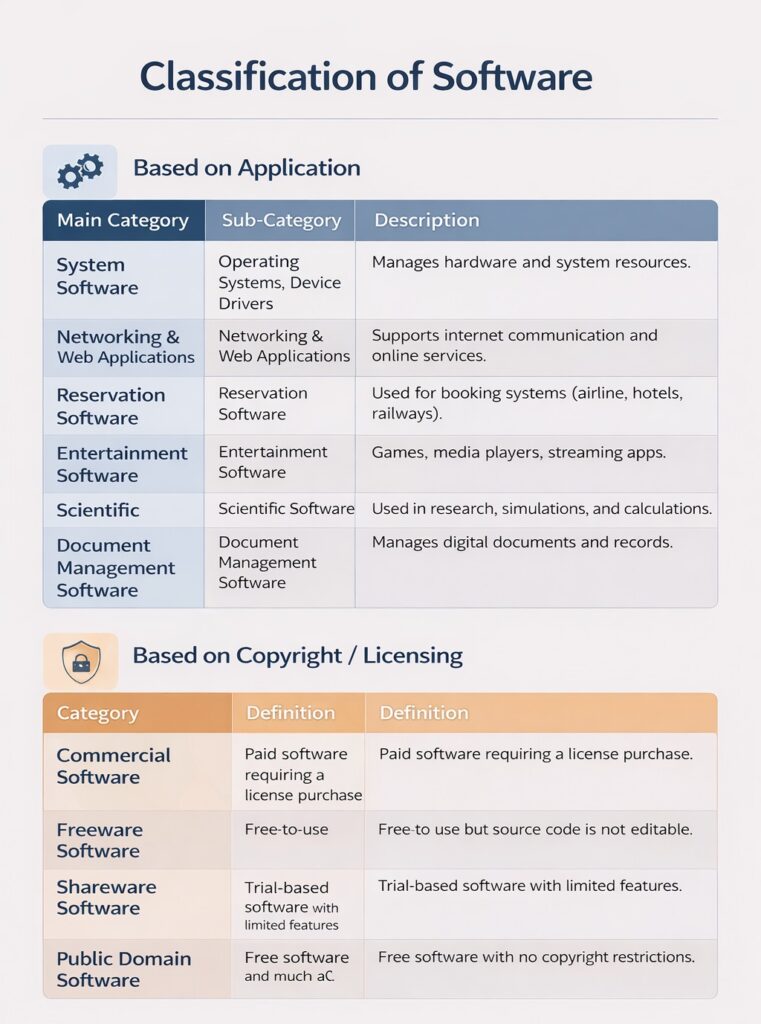
Depending on the Application
System Software
Provides a framework for executing applications and controlling computer hardware. It includes device drivers, operating systems, compilers, and editors, which are all required for the computer to function. Compilers translate high-level languages into machine code, and operating systems provide a bridge between software and hardware.
Application Software
Developed to directly engage with users in order to satisfy their needs. Generic software and customized software are the two categories under which it falls. While customized software is created especially to satisfy a client’s particular needs and is not meant for broad use, generic software is accessible to all users and offers standard functionality.
Networking and Web Applications Software
Facilitates computer-to-computer communication and provides network access to shared resources and data. Network management tools, server software, security and encryption software, and web development technologies like HTML, PHP, and XML are all utilized in network-based settings like the World Wide Web.
Embedded Software
Integrated into hardware, typically kept in Read-Only Memory (ROM), and responsible for controlling particular system operations. It is frequently found in gadgets like satellites, microwaves, washing machines, and other instrumentation and control systems.
Business Software
The most popular type of software, this category supports business applications. Software for accounting, banking, hospitals, schools, financial markets, and inventory management are a few examples.
Entertainment Software
For educational organizations, particularly those that work with young children, education and entertainment software offers a potent weapon. Software for enjoyment comes in many forms, including computer games, instructional games, mapping software, and translation software.
Artificial Intelligence Software
This category includes programs such as artificial neural networks, expert systems, decision support systems, and pattern recognition software. They deal with intricate issues that are unaffected by intricate calculations made with non-numerical algorithms.
Scientific Software
To accomplish enterprise-specific activities, scientific and engineering software meets the needs of its users. Using industry-specific concepts, methods, and formulas, such software is created for particular uses. Software such as MATLAB, AUTOCAD, PSPICE, ORCAD, and others are examples.
Utility Software
The applications in this category carry out particular functions and differ from other software in terms of complexity, size, and cost. Examples include speech recognition software, antivirus software, compression software, and more.
Document Management Software
Reduce paperwork by storing, monitoring, and managing documents digitally. It facilitates effective document indexing and retrieval, security, version control, and history tracking.
Considering Copyright
Commercial Software
Offered by software firms under a license that permits customers to utilize the product but prohibits copying or altering it. The business still owns the software’s copyright.
Shareware Software
Software that is free to copy and distribute for non-commercial uses is known as freeware. Generally speaking, changes, derivative works, and even decompiling are allowed without obtaining consent from the copyright holder.
Freeware Software
This type of software is protected by copyright and permits users to share and copy it for testing purposes. Modifications are not allowed, and users who continue to use the software after evaluation must pay for it.
Public Domain Software
Since the proprietor relinquishes all rights, there are no copyright limitations. There are no restrictions on users’ ability to distribute, alter, reverse-engineer, or duplicate the software.
Conclusion
Finally, understanding how to categorize software components is very significant in creating systems that are easy to understand and work with. Software components are normally categorized depending on what they do, what they are responsible for, and how they relate to each other in the system. When programmers ensure that components such as the user interface, business logic, and data access components are separated, it becomes easy to maintain and improve the software.
Categorizing things properly also ensures that the system functions properly and is safe. Every component has a role to play, which simplifies things and eliminates unnecessary connections. Therefore, problem-solving becomes easy, and modifications can be done smoothly. However, testing remains organized. When software components are properly categorized, they assist in making software more modular, reusable, and maintainable.
Also, modern ways of developing software encourage using parts to build systems. Whether you use systems, small services, or modular design grouping software parts makes the system design clear. Companies benefit from spending money on development and getting things done faster.
In the end, learning how to group software parts is not an idea but a real way to make software that is strong, flexible, and ready for the future. A good way of grouping things lays the foundation for software to succeed and grow in the long term.